

How to Use RealStocks Fixed Investment and FAQ
1. RealStocks Fixed Investment Basics
1.1 What is RealStocks Fixed Investment?
RealStocks Fixed Investment is a long-term investment strategy that allows investors to automatically purchase selected U.S. stocks at a fixed interval, such as weekly or monthly, using a preset amount. This approach reduces the pressure of timing the market and helps investors gradually build long-term holdings.
1.2 What are the benefits of RealStocks Fixed Investment?
1) Automated execution: The system invests according to your schedule, so you do not need to place an order manually each time.
2) Reduced market-timing risk: Investing in multiple installments can lessen the impact of market volatility on investment decisions.
3) Smoother average cost: Regular purchases over time can help average your position cost and encourage disciplined investing habits.
4) Suitable for long-term allocation: This strategy can be used to build long-term positions in high-quality companies.
1.3 Who is RealStocks Fixed Investment suitable for?
RealStocks Fixed Investment may be suitable for investors who:
- Want to develop a long-term investing habit
- Do not have time to monitor the market frequently
- Want to reduce market-timing risk and avoid emotional trading
- Believe in the long-term growth potential of high-quality companies
- Plan to accumulate assets consistently with a Fixed Investment amount
2. How to Create a RealStocks Fixed Investment Plan
2.1 How do I use RealStocks Fixed Investment?
You can set up a Fixed Investment plan in three steps:
1) Access Recurring Investment: Open the MEXC App and go to Trade → RealStocks → Portfolio → More → Recurring Investment.
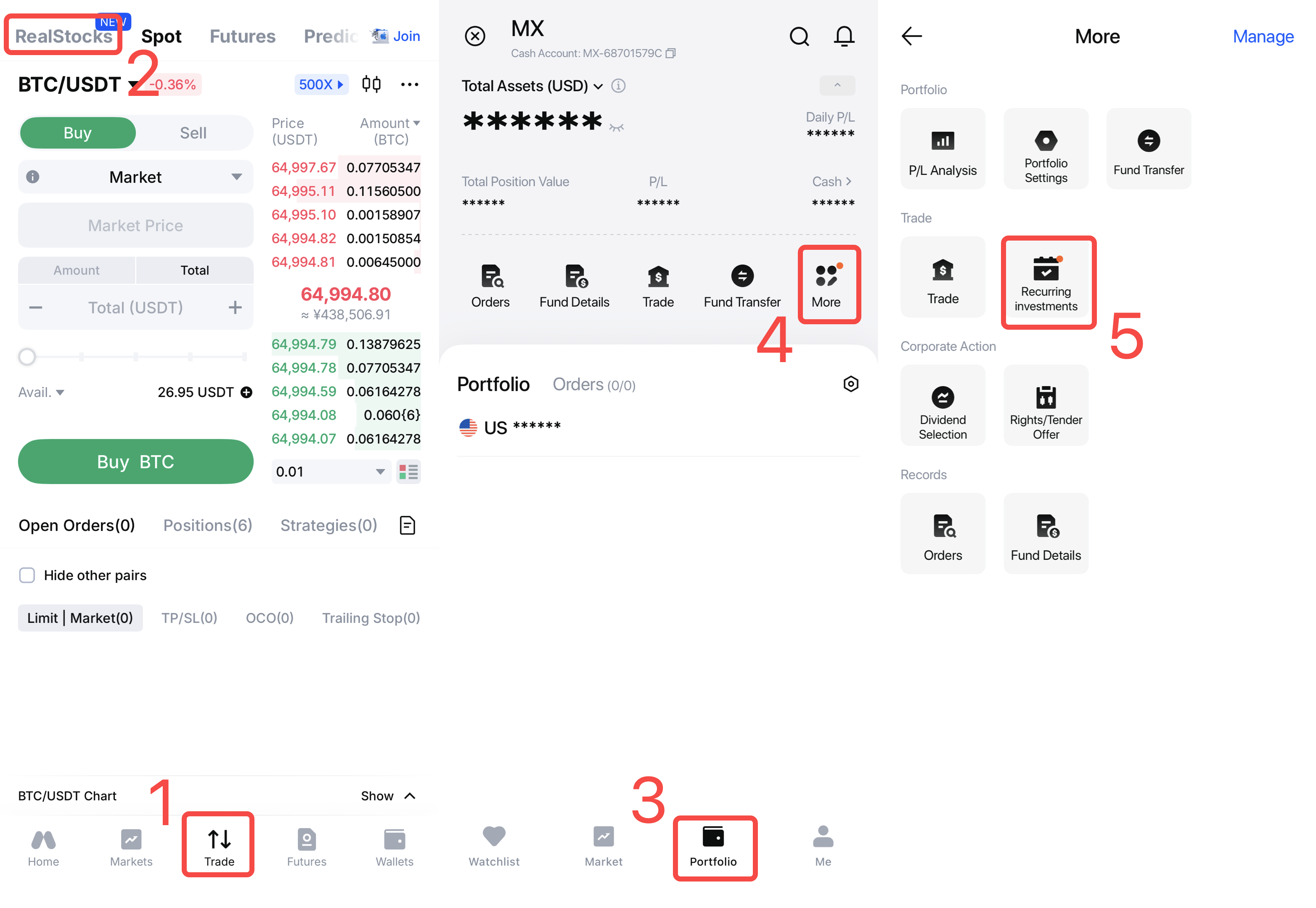
2) Create a Recurring Investment plan: Tap Set up recurring investment → Search for a stock → Set the Investment Frequency and Investment Amount → Read and accept the relevant agreements → Tap Confirm & submit.
3) Automatic execution: At 10:00 ET on each scheduled investment date, the system will automatically submit a market order to purchase the selected stock. After creating the plan, you may modify, pause, or terminate it at any time.
2.2 Which devices support RealStocks Fixed Investment?
RealStocks Fixed Investment is currently available only on the MEXC App. It is not yet supported on the web platform.
2.3 Which stocks are available for Fixed Investment?
Fixed Investment is available for eligible tradable U.S. stocks. Please refer to the MEXC App for the latest list of supported stocks.
2.4 Which investment frequencies are supported?
The system currently provides several Fixed Investment frequencies, such as weekly and monthly. Please refer to the options displayed in the MEXC App for the frequencies currently available.
3. RealStocks Fixed Investment Execution Rules
3.1 When are RealStocks Fixed Investments executed?
At 10:00 ET on each scheduled investment date, the system will automatically submit a market order to purchase the selected stock.
3.2 What order type is used?
The system automatically submits a market order on the scheduled investment date. The actual execution price is determined by the market price available when the order is submitted.
3.3 Why is the execution price different from the price I expected?
Fixed Investment orders are executed as market orders, so the final execution price is determined by the market price when the order is submitted. It may therefore differ from the price displayed when you created the plan. This is normal.
4. Managing a RealStocks Fixed Investment Plan
4.1 Can I modify or cancel a Fixed Investment plan?
Yes. After creating a Fixed Investment plan, you can:
- Edit the investment amount
- Edit the investment frequency
- Pause the plan
- Resume the plan
- Cancel the plan
Any changes will take effect from the next scheduled execution.
4.2 Where Can I View My Fixed Investment Records?
Open the MEXC App and go to Trade → RealStocks → Portfolio → More → Recurring Investment → My Recurring Investment. You can view:
- Fixed Investment plan
- Execution record
- Execution price
- Executed quantity
- Executed amount
- Execution status
4.3 Will my RealStocks Fixed Investment stop after I sell my stocks?
No. Selling shares you already hold will not affect an existing Fixed Investment plan. The system will continue to execute the plan according to the selected frequency. To stop future investments, you must manually pause or terminate the plan.
5. RealStocks Fixed Investment Exceptions
5.1 What happens if my available balance is insufficient?
If your account does not have enough available funds, the scheduled investment will not be executed successfully. Please add sufficient funds before the next investment date to ensure that your plan can run as scheduled.
5.2 Will Fixed Investment plans automatically retry if an investment fails?
No. If a scheduled investment fails because of insufficient funds or another reason, the system will not place a replacement order. The plan will attempt to execute again at the next scheduled interval using your existing settings.
RealStocks Fixed Investment provides a disciplined and automated way to invest for the long term. It can help reduce market-timing risk and smooth the average cost of your holdings. If you have any questions while using this feature, please contact Customer Service through the MEXC App.